Create Your Own Gig
Gigs are your personal showcase of skills and services. Whether you're a designer, developer, writer, or creator, your Gig is the first thing clients will see. It’s your opportunity to stand out with a professional presentation, clear pricing, and flexible packages tailored to your audience.
This page explains how Gigs work, how you can optimize your offer, and why creating a Gig can help you reach more clients and generate steady income.
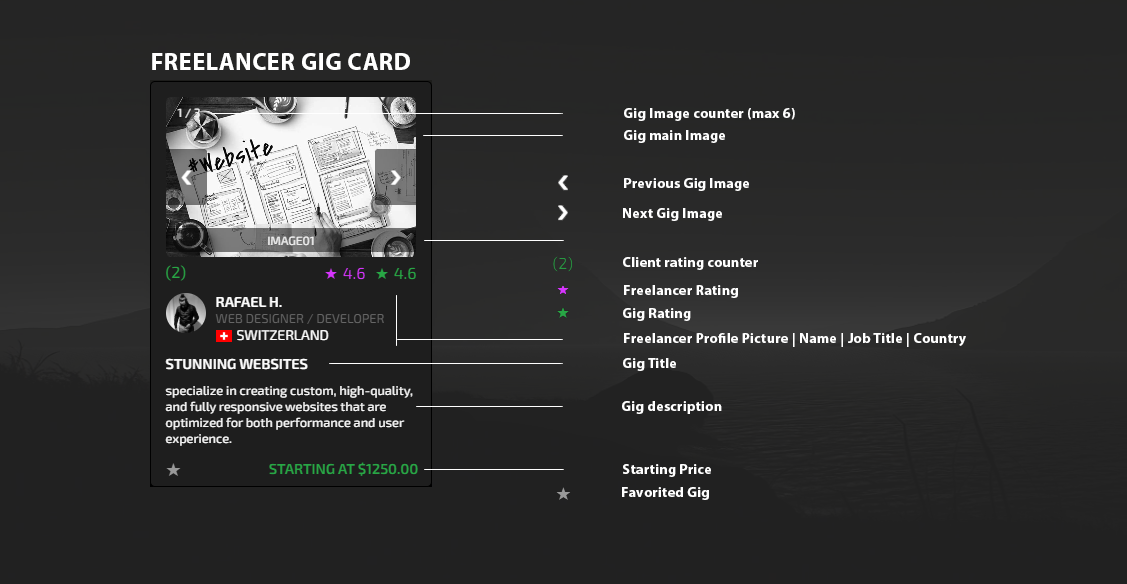
Key Features of a Gig
- Showcase your work with an eye-catching Freelancer Gig Card.
- Offer multiple packages: Basic, Premium, and Platinum.
- Customize your Gig with extras and add-on services for increased value.
- Get client reviews and ratings to boost your profile and credibility.
- Set competitive pricing that fits your skill level and experience.
Packages, Pricing Model & Add-ons
Our pricing model is designed to give freelancers full control while offering clients transparent and flexible options. Every Gig can include up to three packages, each tailored to different project scopes and budgets. This allows clients to choose exactly what they need while freelancers can increase their earnings by offering advanced services.
In addition, you can add **Extras** (e.g., priority delivery or extra revisions) and **Add-ons** (e.g., custom features or bundled services) to further enhance the value of your Gig.
The Three Core Packages
- Basic: Ideal for small or quick tasks. Offers a simple, budget-friendly option with limited features and faster delivery for entry-level projects.
- Premium: Perfect for medium-sized projects. Includes extended features, more detailed work, and additional support compared to the Basic tier.
- Platinum: The ultimate package for high-value clients. Designed for complex projects, this tier includes top-level priority, maximum revisions, and premium-quality deliverables.
Not a Freelancer or Creator Yet?
Sign up as a Freelancer to start creating Gigs and earn money by offering your skills. You don’t need to be a company — anyone with talent can get started.
If you’re a client but want to launch Jumppad projects, upgrade your account to a Creator. With a Creator account, you can create campaigns, build teams, and fund innovative projects. More details can be found in the footer under "Freelancer" → "Start Jumppad Projects."